
Your buildings. Your data. A map people can explore.
Blocklight turns building footprints and JSON records into interactive city maps. Start in 3D, zoom out to flat footprints, switch datasets, and click a building to see what’s behind its color.
Built with TypeScript and MapLibre GL JS. Framework-independent, with an optional React entry point. MIT licensed.
0.1 developer preview. Available on npm. APIs may change before 1.0.
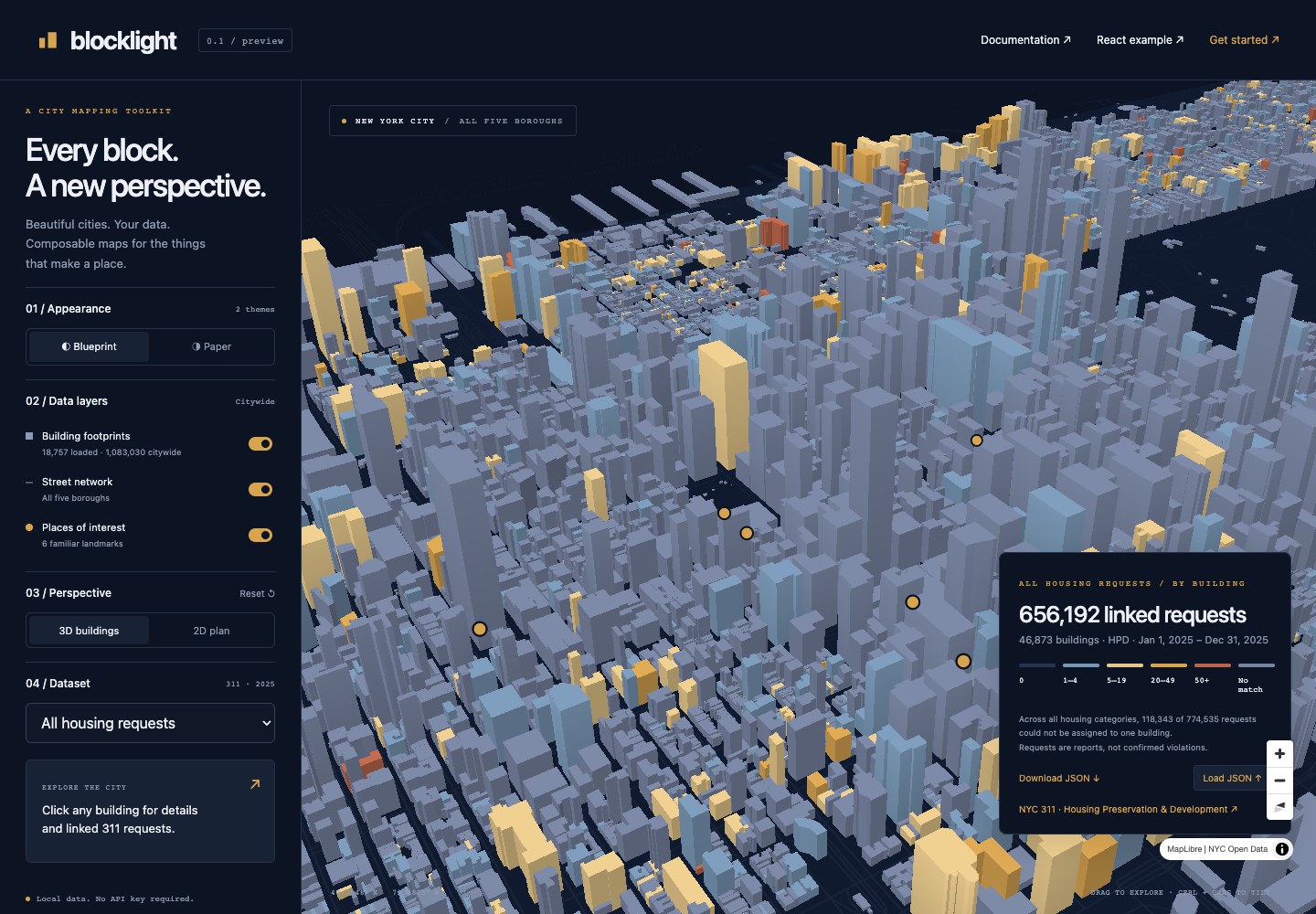
The NYC showcase: 3D footprints, building-level request counts, and controls for themes, datasets, and perspective.
Live demo · Documentation · npm
A building map needs more than a renderer. Records need to match the right footprint. Colors need a legend. Selection needs to survive a change of dataset or perspective.
Blocklight handles those pieces together:
- Building-level joins. Connect JSON records to footprint IDs, count records or sum a field, and keep missing data distinct from a real zero.
- Multiple datasets. Give each dataset its own source, label, aggregation, and color scale. Switching preserves the camera and selected building.
- 2D and 3D. Extruded buildings up close; flat footprints when zoomed out. Selection carries across views.
- Ready-made interaction. Dataset and perspective controls, a matching legend, click details, loading status, and error reporting.
- Your own data and hosting. Load GeoJSON and JSON from URLs or pass parsed objects. The examples need no API key or hosted map service.
- Room to customize. Use the lower-level building controllers, add layers, or access MapLibre directly.
MapLibre supplies rendering and camera interaction. Blocklight supplies the building-data workflow. It fits maps of service requests, permits, energy use, or other records tied to individual buildings. You provide the source data and its meaning.
From a checkout of this repository, using Node.js 22.12 or later:
npm ci
npm run dev
Open the URL printed by Vite:
| Route | What you’ll find |
|---|---|
/ |
New York: themes, 311 datasets, building details, and JSON upload |
/?city=chicago |
Downtown Chicago: construction year and reported stories |
/?city=seattle |
Downtown Seattle: 2024 energy use and emissions intensity |
/?city=atlanta |
Downtown and Midtown Atlanta: building height and reported floors |
/examples/basic/ |
A small map of building footprints |
/examples/datasets/ |
Housing and plumbing requests with separate color scales |
/examples/chicago/ |
Chicago buildings colored by construction year or reported stories |
/docs.html |
Configuration, data preparation, and API reference |
/react.html |
React lifecycle example |
Use the city selector above the map to switch between New York, Chicago, Seattle, and Atlanta. Chicago, Seattle, and Atlanta are bundled downtown extracts, with reproducible import scripts and source notes in DATA.md. The Atlanta extract is Overture Maps data under ODbL, a share-alike licence; the others use permissive municipal terms.
The examples include small local fixtures. A fresh checkout runs without downloading a city. The showcase falls back to the Midtown sample when citywide assets are absent.
Give the map a container with a height:
<div id="map" style="height: 600px"></div>Then create it. This is the complete TypeScript from the basic example:
import { createMap } from 'blocklight';
import 'blocklight/style.css';

createMap({
  container: '#map',
  center: [-73.9815, 40.7548], zoom: 16,
  buildings: new URL('./data/buildings.geojson', import.meta.url).href,
  controls: ['perspective'],
  details: { fields: [{ key: 'height_m', label: 'Height (m)' }] },
});
Blocklight configures its bundled worker. The stylesheet includes MapLibre’s CSS. The default camera is tilted, and the map switches to flat footprints below zoom 14.
A dataset can be as small as this JSON array:
[
  { "buildingId": "123", "count": 8, "plumbing": 0 },
  { "buildingId": "456", "count": 12, "plumbing": 3 }
]
Each buildingId matches a footprint’s source_id. Set value to the field to sum, or omit it to count records. You can point several datasets at one JSON file; the controller fetches a shared URL once.
The complete two-dataset example:
import { createMap } from 'blocklight';
import 'blocklight/style.css';

const source = new URL('./data/requests.json', import.meta.url).href;
const join = { building: 'source_id', record: 'buildingId' };

createMap({
  container: '#map',
  center: [-73.9815, 40.7548], zoom: 16,
  buildings: {
    source: new URL('./data/buildings.geojson', import.meta.url).href,
    detailZoom: 14, attribution: 'NYC Open Data · 2025 HPD requests',
  },
  datasets: [
    { id: 'housing', label: 'Housing requests', source, join, value: 'count', colors: 'amber' },
    { id: 'plumbing', label: 'Plumbing requests', source, join, value: 'plumbing', colors: 'teal', breaks: [0, 1, 5] },
  ],
  details: {
    fields: [{ key: 'height_m', label: 'Height (m)' }, 'bin'],
    note: 'Requests are reports, not confirmed violations.',
  },
});
The dataset selector, perspective button, legend, and details panel are built in. No event handlers are needed for these controls. Details update when the active dataset changes.
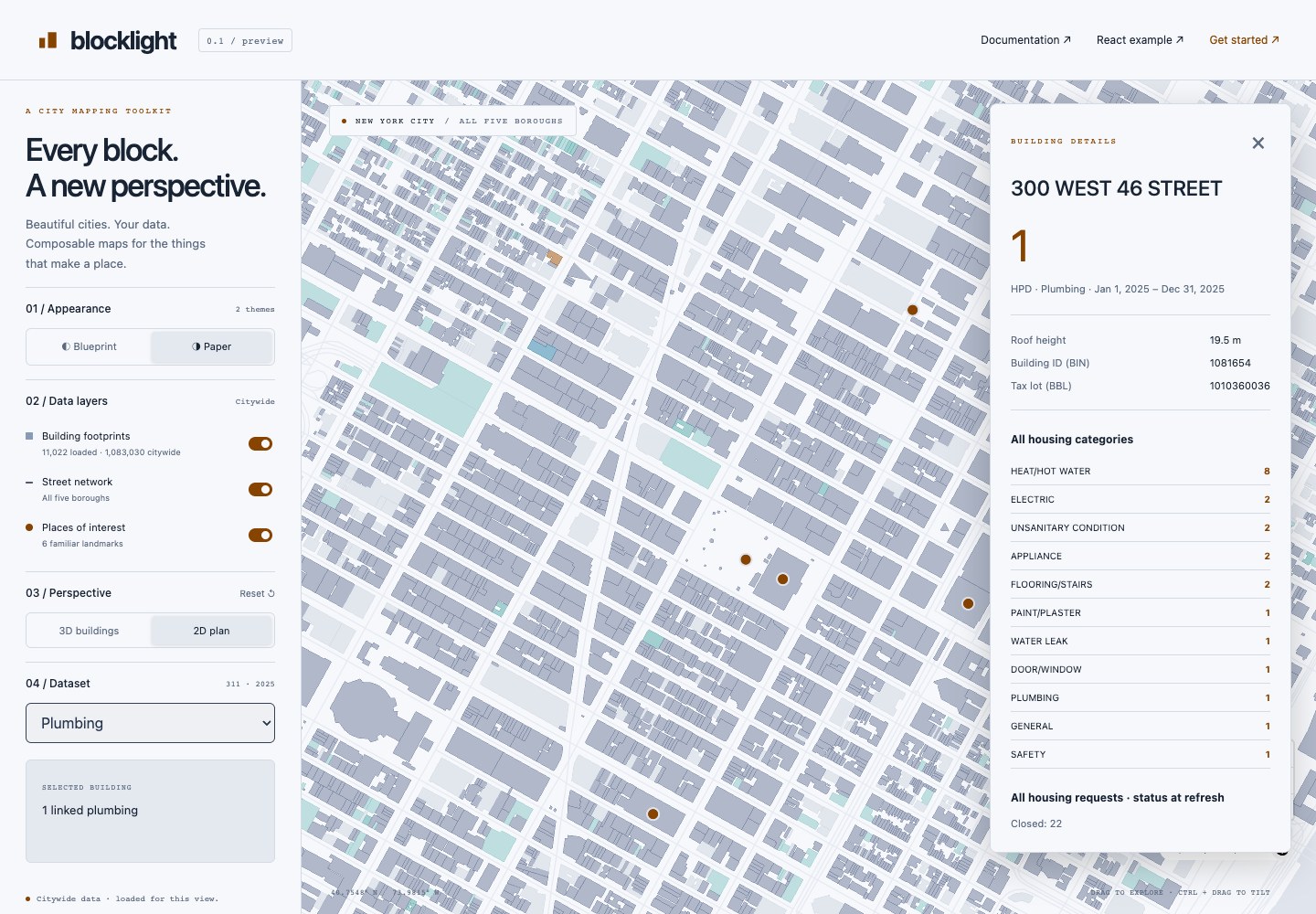
The same map in 2D, using the Paper theme and plumbing dataset. Clicking a building opens its linked records and attributes.
| Configuration | Use it for |
|---|---|
theme: 'blueprint' or 'paper' |
Dark or light base styling; custom theme objects are also supported |
colors: 'amber', 'teal', or 'rose' |
Dataset palettes with three numeric breaks; use steppedScale() for a custom scale |
details: { title, fields, note } |
A building title, fields from the footprint or first matched record, and explanatory text |
controls: ['datasets', 'perspective', 'legend'] |
Choose which built-in controls to show |
buildings: { source, featureId, heightProperty } |
Use your own footprint schema; defaults are source_id and height_m |
buildings: { source, overview, detailZoom } |
Use separate overview geometry and viewport-loaded detail |
terrain: { source, exaggeration } |
Raise the map onto 3D elevation, from a raster-dem source you supply |
terrain: { source, mask } |
Cover relief where the elevation model is unreliable, such as water; outsideMask() builds one from a landmass |
buildings: { source, heightProperty } |
Footprints reporting no height are draped onto the terrain rather than buried by it |
buildings: { source, elevationProperty } |
Start each building at its own ground elevation instead of at zero |
Keep the returned controller when you want to drive the map from your application:
// map is the result of createMap(config).
await map.ready;
await map.setDataset('plumbing');
map.setPerspective('2d');
map.setTheme('paper');
map.setTerrain(null); // or pass a raster-dem source to raise the map onto elevation

const selection = map.getSelection();

// When your component unmounts:
map.destroy();
ready means the building view has been installed, not that the browser has finished painting. Catch it when awaiting it in application code. For custom layers and events, use map.engine; for the underlying MapLibre map, use map.engine.map.
Footprints must be GeoJSON polygons or multipolygons in longitude/latitude coordinates, with a stable, unique building ID. Heights are in meters. JSON records must have a corresponding join key. Both the ID and height property names are configurable.
A missing match is not zero. Blocklight keeps unmatched, ambiguous, missing-key, and unverified results separate from matched values. A request attached to a lot containing several buildings must not be counted against every building. The matchBuildingRecords() preprocessing helper can resolve a shared lot key when a record’s coordinates fall inside exactly one candidate footprint.
The library does not geocode addresses or download a building dataset for you. Its 3D buildings are footprint extrusions, not architectural meshes. Large datasets need preparation: geometry can load by viewport, but configured JSON attribute tables are held in memory. The guide covers tiled geometry, vector overviews, matching, and missing-data behavior.
The bundled NYC 311 example shows reported requests, not confirmed violations or building-quality ratings. Source data has separate terms and attribution from the library’s code.
Install the package and its rendering dependency:
npm install blocklight maplibre-gl@^6For a complete starting point, copy playground/examples/datasets into a new project, run that install command there, then run npm run dev. Installing from npm replaces the example’s local workspace dependency.
To test unpublished local changes, run npm run build -w blocklight and npm pack -w blocklight from the repository, then install the generated .tgz file in your application.
The examples use Vite. Other bundlers must support CSS imports and emit new URL(..., import.meta.url) assets, or you can serve the packaged worker yourself and pass workerUrl. Rendering requires WebGL 2 and a modern browser. Create maps after the container mounts; module imports are safe during server rendering. React is optional.
npm run check          # Documentation sync, types, unit tests, and production build
npm run test:browser   # Map interactions and lifecycle in Chrome
npm run test:consumer  # Install, build, and run the packed library in a separate app
Install the browser for integration tests with npx playwright install --with-deps chrome.
The library lives in packages/blocklight, the showcase and examples in playground, and data preparation scripts in scripts/data. To build the optional citywide NYC assets, run npm run data:city; these generated files are excluded from Git and the package.
Contributions are welcome. Keep the core independent of any one city or framework, include provenance for new sample data, and add focused tests for behavior changes. See CONTRIBUTING.md in the repository for the development workflow and DATA.md for source provenance.
The full guide lives in docs/guide.md and is rendered at /docs.html in the local app. Edit docs/readme.md to change this README, or the runnable examples to change its code snippets, then run npm run docs:build. The repository and package READMEs are generated together.
MIT © Henry Williams. See LICENSE. The license covers Blocklight’s code; bundled public datasets retain their source terms.